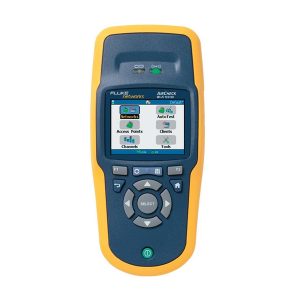
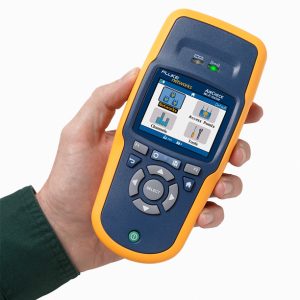


Fluke Networks AIRCHECK WI-FI Tester
- AIRCHECK WI-FI Tester
- Supports 802.11a/b/g/n – All in one handheld tool.
- Instant-on operation – Powers up in less than three seconds and automatically starts discovering networks, access points (APs), and channel activity.
- Get answers fast – The one-button AutoTest quickly provides a pass/fail indication of the wireless environment and identifies common problems – for any level of Wi-Fi expertise.
- Identifies security settings for each Network and Access Point: Open, WEP, WPA, WPA2, and/or 802.1x.
- Pinpoints Wi-Fi traffic and interference – Shows how much of each channel’s bandwidth is consumed by 802.11 traffic and interference, and the APs using each channel.
- Finds rogue APs and misbehaving clients – Flags unauthorized APs and clients. Hunt them down with the LOCATE function or find them even faster with the optional directional antenna.
- Connection tests – Connects to networks or specific APs using WEP, WPA, WPA2, and/or 802.1x. Acquires an IP address and pings the router, gateway, and user-defined addresses to verify connectivity and network access inside and outside the firewall. Verifies connection quality.
- Designed for the field – Five-hour battery life. One-handed operation. Rugged design.
- Documents results – Saves complete results of the current troubleshooting session for download to your PC.
- Easy upgrades – The mini-USB port allows software upgrades in the field in just minutes. And with Gold support, you’ll automatically receive upgrades at no additional charge.

AIRCHECK WI-FI Tester
Supports 802.11a/b/g/n
All in one handheld tool.
Instant-on operation
Powers up in less than three seconds and automatically starts discovering networks, access points (APs), and channel activity.
Get answers fast
The one-button AutoTest quickly provides a pass/fail indication of the wireless environment and identifies common problems – for any level of Wi-Fi expertise.
Wi-Fi is a complex technology, but testing it doesn’t have to be. The AirCheck Wi-Fi tester allows network professionals to quickly verify and troubleshoot 802.11 a/b/g/n networks. Designed specifically for dispatched troubleshooting, AirCheck simplifies wireless testing by providing:
- A one-button AutoTest, which quickly provides a pass/fail indication of the wireless environment and identifies common problems – for any level of Wi-Fi expertise.
- An instant view to required test results including network availability, connectivity, utilization, security settings, rogue hunting, and interference detection
- A rugged, purpose-built Wi-Fi tester that’s easy to use and easy to carry
Its intuitive design and standardized AutoTest makes it simple for anyone to quickly master AirCheck. Instant power-up , automated testing, and quick access to more detailed information, so you can close trouble tickets faster – making technicians and users alike more productive. Easily manage test results and documentation using AirCheck Manager software. From start to finish, AirCheck helps take the guess work out of everyday wireless troubleshooting.
Overview
AirCheck integrates all Wi-Fi technologies plus interference detection, channel scanning, and connectivity tests. The one-button AutoTest and instant access to detailed information provides fast troubleshooting for the most common Wi-Fi pain points, including:
- Coverage problems
- Overloaded networks or channels
- Interference
- Connectivity problems
- Failed access points
- Rogue access points
- Security settings
- Client problems
In addition to generating instant reports and documentation, AirCheck Manager software allows you to set up multiple profiles and manage network and security settings for a single unit, or an entire fleet of AirCheck testers.
AirCheck Functions
AutoTest – Performs three essential WiFi tests and a pass/fail indication of the wireless environment and identifies common problems – for any level of expertise.
Air Quality – Checks for Wi-Fi and non Wi-Fi utilization by channel, plus co-channel interference.
Network Quality – Verify coverage, interference, security and ability to connect to specified networks.
Rogue Access Points – Identify AP’s not listed in the profile
AutoTests are user configurable and based on the multiple profiles which can be stored in AirCheck and selected for different sites or requirements. Results may also be stored for export to AirCheck Manager.
List Networks
Find security issues, rogue APs and coverage problems and view a list of all wireless networks heard by AirCheck. Instantly see the following for each network:
List Access Points
Find configuration and coverage problems as well as rogue APs. View a list of all physical APs heard by AirCheck or clients connected to a specific AP, and see the following:
Channel Usage
Quickly determine if channels are overloaded due to Wi-Fi traffic (displayed in blue) or interference (displayed in gray). Verify channel-usage pattern or overlap and flag illegal use of channels.
With AirCheck, you can also detect the presence of interference. Devices that can cause interference include microwave ovens, cordless phones and headsets, BlueTooth® devices, and analog video cameras.
Drill in further to see the level of Wi-Fi traffic and interference over the last 60 seconds on a selected channel, as well as the access points using this channel.
Access Control Settings
Quickly determine which access points are known and which are not by setting the authorization status for each AP seen by AirCheck. You may also define access control settings in AirCheck Manager and download them in a profile.
Locate Access Points and Clients
Track down rogue and other APs or clients by graphing the signal strength over time, or by using an audible indication which can be muted.
Access Point Details
Quickly identify AP configuration problems. View the following information for each physical AP:
Connect
Verify network availability and access by connecting to a network (SSID) or specified AP using three simple steps:
View the process steps on the display and store them in a log for troubleshooting. Quickly test performance and quality of the connection by using the continuous ping response, loss-rate, and connection-range features.
Client Details
Easily find misconfigured or failed client devices. Quickly drill into client details to see signal level, AP MAC and name, channel, SSID, type and determine the channels and frequencies on which the client is probing.
AirCheck Manager Software
This software is included with AirCheck and provides two capabilities: the ability to manage AirCheck profiles and manage sessions recorded with AirCheck.
Profiles
Easily configure, manage, and control the use of your AirCheck – or an entire fleet of them – with the Profiles feature, which allows configuration of security settings, AutoTest limits, and target devices for connectivity.
Name and transfer multiple profiles into AirCheck, as needed for different facilities. You can also transfer profiles from AirCheck to AirCheck Manager software.
Profiles are password protected, both in AirCheck and in AirCheck Manager, eliminating worry about unauthorized access to your network if your Air-Check is lost or stolen.
Record Session
Document what AirCheck is seeing to share or archive. Create summary or detailed reports allowing you to quickly close a trouble ticket or provide documentation for problem escalation. Press one key to record all collected details including AirCheck con?guration, AutoTest results, lists of AP’s / clients and channel usage. Transfer sessions to a PC and easily view/store them using AirCheck Manager software.
Manufacturer Specs
| General Specifications | ||
| Dimensions | 3.5 in x 7.8 in x 1.9 in (8.9 cm x 19.8 cm x 4.8 cm) | |
| Weight | 14 oz (0.4 kg) | |
| Battery | Removable, rechargeable lithium-ion battery pack (18.5 Watt-hrs) | |
| Battery life | Typical operating life is 5.5 hours. Typical charge time is 3 hours. | |
| External AC adapter/charger | AC input 90-264 Vac 48-62 Hz input power DC output 15 Vdc at 1.2 amps | |
| Display | 2.8 in color LCD (320 x 240 pixels) | |
| Keypad | 12-key elastomeric | |
| LEDs | 2 LEDs (transmit and link Indicators) | |
| Host interface | USB 5-pin mini-B | |
| Wireless antenna | Internal | |
| External antenna port | Input only. Reverse-polarity SMA connector. | |
| Wireless | ||
| Specification compliance | IEEE 802.11a, 11b, 11g, 11n | |
| Receive Channel Frequencies | 2.4 GHz Band* | 2412-2484 MHz (Channel 1 to Channel 14) |
| 5 GHz Band* | 5170-5320 MHz, 5500-5700 MHz, 5745-5825 MHz (Channels 34, 36, 38, 40, 42, 44, 46, 48, 52, 56, 60, 100, 104, 108, 112, 116, 120, 124, 128, 132, 136, 140, 149, 153, 157, 161, 165) | |
| *Notes |
|
|
| Transmit Channel Frequencies | 2.4 GHz Band** | 802.11b 2412-2484 MHz (Channel 1 to Channel 14)802.11 g/n 20 MHz BW (HT20) 2412-2472 MHz (Channel 1 to Channel 13) 802.11n 40 MHz BW (HT40) |
| 5GHz Band** | 802.11 a /n 20 MHz BW (HT20) 5180-5320 MHz, 5500-5700 MHz, 5745-5825 MHz (Channels 36, 40, 44, 48, 52, 56, 60, 100, 104, 108, 112, 116, 120, 124, 128, 132, 136, 140, 149, 153, 157, 161, 165)802.11 n 40 MHz BW (HT40) 5190-5310, 5510-5670, 5755-5795 (All legal bonded channel pair combinations) |
|
| **Notes |
|
|
| Regulatory Domain | World Mode, 802.11d compliant | |
| External Directional Antenna | ||
| Frequencies | Frequency range 2.4 GHz to 2.5 GHz and 4.9 to 5.9 GHz Minimum gain 5.0 dBi in the 2.4 GHz band and 7.0 dBi in the 5 GHz band | |
| Connector | Reverse-polarity SMA plug | |
| Environmental Specifications | ||
| Operating temperature and relative humidity | 32ºF to 113ºF (0ºC to +45ºC) Note: The battery will not charge if the internal temperature of the tester is above 113ºF (45ºC) |
|
| Operating relative humidity (% RH without condensation) | 90% (50ºF to 95ºF; 10ºC to 35ºC) 75% (95ºF to 113ºF; 35ºC to 45ºC) |
|
| Storage temperature | -4ºF to 140ºF (-20ºC to +60ºC) | |
| Shock and vibration | Random, 2 g, 5 Hz-500 Hz (Class 2) 1 m drop test | |
| Safety | EN 61010-1 2nd edition | |
| Altitude | Usage up to: 4,000 m; Storage: 12,000 m | |
| EMC | FCC Part 15 Class A, EN 61326-1 | |
Related products
Uncategorized